
pos
How Long Does It Really Take to Switch POS Systems — And How Do You Keep Operations Safe?
the real timeline involved in switching POS systems, from initial setup and data migration to staff training and go-live. It covers the five key phases of a POS transition, common challenges such as data loss, downtime, pricing errors, and integration issues, and the steps businesses can take to protect operations throughout the process. The guide also outlines how parallel testing, proper staff preparation, and structured onboarding help businesses move to a new POS platform with minimal disruption while maintaining normal sales and customer service activities.
SEO Keywords
Contents

CEO, Warely
Read »
A straight-talking guide for Singapore business owners who want the truth — no fluff, no guesswork.
The Real Question You’re Actually Asking
You’re not just looking for a new POS system. You’re looking for a way to make a change without breaking everything you’ve built.
Switching your POS system feels risky. You have staff who know the current system. You have sales happening every day. You have customer data you cannot afford to lose. The idea of a new system going live in the middle of a busy Friday evening is enough to make anyone hesitate.
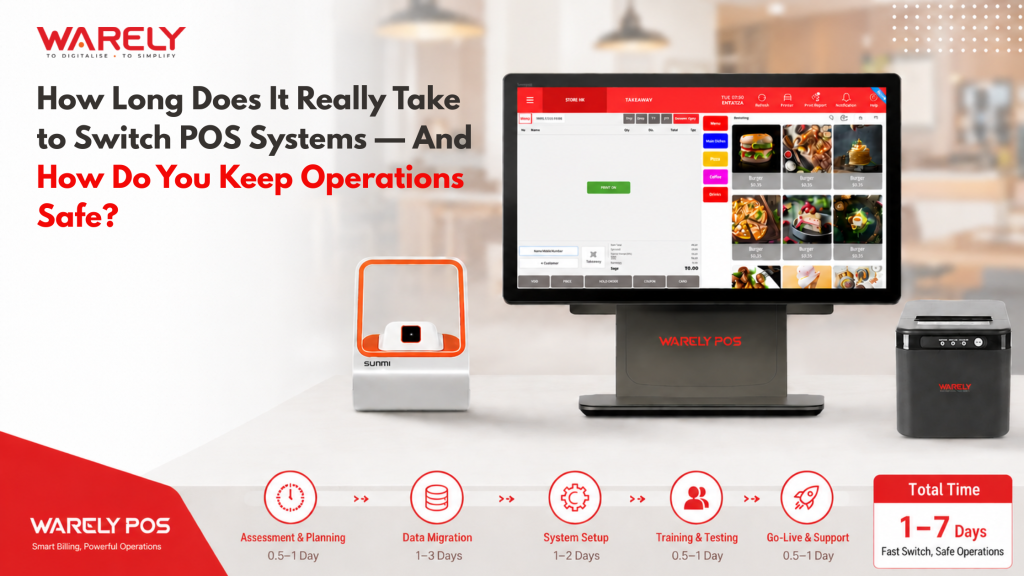
a typical POS switch takes between 1 and 4 weeks. For most small businesses in Singapore — a café, a retail shop, a restaurant with one outlet — the active changeover is closer to 1 to 2 weeks. Larger operations with multiple outlets or complex menus may take 3 to 4 weeks.
The best part? With the right provider like Warely POS, your old system stays active until you are fully ready to switch over. You are always in control.
How Long Does a POS Switch Actually Take? (Week by Week)
Here is what a realistic switch looks like for a typical Singapore F&B or retail business.
Week 1 — Days 1 to 5: Account Setup and Data Preparation Your Warely onboarding consultant sets up your account. You provide your product list, pricing, and existing data. The Warely team imports your menu or inventory — you don’t do this manually. Your old system is still fully running during this time.
Week 2 — Days 6 to 10: Staff Training and Parallel Testing Your staff spend 30 to 60 minutes learning the Warely interface. Most staff describe it as easy to pick up. You run a test day where both systems are active — this catches any issues before they affect real customers.
Week 3 — Days 11 to 15: Go-Live with Support on Standby You switch to Warely as your primary system. The Warely support team is available during your first live days. Most businesses report a smooth first week with no disruption to sales.
Day 15 Onwards: Full Operation You are fully live. You start using real-time reports, inventory tracking, and staff performance insights. This is where Warely starts saving you money and time on a daily basis.
Tip: Schedule your go-live date on a quieter day — a Tuesday or Wednesday. Avoid switching over during a public holiday or your busiest weekend of the month.
The 5 Phases Every POS Switch Goes Through
Whether you are moving from a legacy cashier system or an older cloud POS, every switch goes through the same five phases. Knowing these phases helps you stay calm and on schedule.
Phase 1 — Discovery. You speak with the Warely team to understand what you need. Your current pain points are mapped to the right Warely features. This takes 1 to 2 days.
Phase 2 — Data Migration. Your product catalogue, pricing, customer accounts, and historical sales data are moved into Warely. The Warely team handles this for you. It takes 2 to 3 days depending on how much data you have.
Phase 3 — Hardware Setup. If you need new hardware — tablets, receipt printers, barcode scanners — these are configured and tested on-site by the Warely team. This takes 1 day.
Phase 4 — Training. Staff training takes 30 to 90 minutes for most teams. Warely’s interface is designed to be intuitive, so even non-tech-savvy staff adapt quickly.
Phase 5 — Go-Live and Hypercare. Your system goes live. For the first two weeks, Warely support is available via phone and chat. Any minor issues get resolved fast during this period.
What makes Warely different from most providers is this: you are assigned a dedicated onboarding consultant who stays with you through every phase — not just on setup day.
The Biggest Risks During a POS Switch (And Why They Happen)
Switching POS systems does carry real risks. Understanding them is the first step to avoiding them.
Data loss during migration is the highest-risk issue. It usually happens when businesses do not back up their old system properly before migration begins. Always export everything from your old system before Day 1.
Staff confusion at the counter is the second most common issue. It happens when training is rushed or done too close to go-live. Staff who are given enough time to learn the system — even just 60 minutes — perform confidently from the first day.
Downtime during go-live is a medium risk that is almost entirely avoidable. It usually happens when businesses choose to switch during peak hours. Switch during a quiet period and keep your old system accessible as a backup for the first 48 hours.
Integration failures happen when your old system had custom connections to accounting software or delivery platforms that were not mapped into the new system. The Warely onboarding team identifies these in Phase 1 so nothing is missed.
Incorrect pricing after migration is a simple risk that is easy to catch. Before going live, walk through your top 20 products in the new system and confirm every price is correct.
The most common mistake businesses make is trying to switch during their busiest month because they feel there is never a good time. There is a better time — pick a slower week and give yourself breathing room.
How to Protect Your Business Operations During the Switch
You do not have to choose between upgrading your system and keeping your business safe. These practical steps protect you through the entire transition.
Run both systems in parallel for at least 3 days before switching fully. Your old system is your fallback if anything goes wrong during this window.
Back up all your data before Day 1. Export every sales record, customer list, and product catalogue from your old system before the migration begins.
Train staff on a quiet day — not the morning before a lunch rush. Give them time to ask questions without any pressure from customers.
Brief your team on what is changing and why. Staff who understand the reason for the change are far more patient with a learning curve than staff who feel surprised by a new system.
Have your Warely consultant’s number saved on every device at the counter. If something unusual happens on Go-Live day, you should be able to get help within minutes.
Do a price audit before your first customer. Have a staff member check your top 20 products in the new system to confirm all prices are correct.
Do not switch the week before a major sale or public holiday. Give yourself two clear weeks of stable trading before any peak season.
Real Customer Success Stories
These are real stories from Singapore business owners who made the switch to Warely POS. They had the same concerns you have right now.
Rachel Lim — Owner, Nourish Bistro, Toa Payoh
Rachel had been putting off switching for over a year. She was worried about losing her customer data and disrupting her lunch service. The Warely team had her fully live in 11 days. Her staff learned the system in a single afternoon session. In the first month after switching, checkout times dropped by 30% and queue complaints stopped entirely.
“I kept putting it off because I thought it would take months. The Warely team had us live in 11 days. My staff learned the system in one afternoon.”
Get Up to 50% Off with Singapore’s PSG Grant
If you are a Singapore-registered SME, you may be eligible to get up to 50% of your Warely POS subscription cost subsidised through the government’s Productivity Solutions Grant (PSG).
Warely POS is a pre-approved PSG vendor. That means the government has already vetted the solution and confirmed it qualifies for funding. You do not need to make the case for it — the approval pathway is already established.
For a typical SME spending $200 per month on a POS system, a 50% subsidy saves you $1,200 a year. For businesses paying more, the savings scale accordingly.
To qualify, your business needs to be registered in Singapore, have at least 30% local shareholding, and be using the solution for Singapore operations.
The application is done through the Business Grants Portal. Warely’s team guides you through the process and prepares the technical documentation on your behalf. Most businesses complete the application in under an hour. Approvals typically come through within 2 to 4 weeks — and you can begin using the system while your application is being processed.
PSG grant slots are allocated on a quarterly basis. Starting the conversation now means you are in the queue for the next funding window rather than waiting another quarter.
Your Complete Pre-Switch Checklist
Work through this list before you go live. Tick each item off in order and share it with your manager or senior staff.
2 Weeks Before Go-Live Export all data from your current POS — products, prices, customer records, and sales history. Confirm your go-live date with your Warely consultant. Inform key staff about the change and give them a clear timeline. Identify one staff member who will be the go-to person for questions from the rest of the team.
1 Week Before Go-Live Complete the staff training session with your Warely trainer. Run a parallel test — process 10 to 20 transactions on both systems and compare the results. Verify all product names, prices, and categories in Warely match your current menu or catalogue. Confirm that all hardware — printer, scanner, tablet — is working correctly.
Go-Live Day Start on a quieter trading shift, ideally a morning or a Tuesday. Keep the Warely support number visible at the counter. Keep your old system accessible but switched off as the primary system. Do a price check on your top 20 products before your first customer of the day.
Common Questions Business Owners Ask Before Switching
Will I lose my sales history when I switch? No. Warely migrates your historical sales data as part of the onboarding process. Your reports carry forward from your old system so you do not lose visibility on past performance.
What if my internet goes down during a busy period? Warely POS has an offline mode. Transactions are processed locally and sync automatically when your connection is restored. You never lose a sale because of an internet issue.
How long does staff training actually take? For most roles, 30 to 60 minutes is enough to handle daily operations with confidence. For management features like reports and inventory management, allow 90 minutes.
Can I manage multiple outlets from one account? Yes. Warely supports multi-outlet management from a single dashboard. You can view sales, inventory, and staff performance across all your locations in real time.
How do I apply for the PSG Grant with Warely? Warely’s team guides you through the application on the Business Grants Portal. Warely handles the technical documentation on your behalf so the process is straightforward for you.
What hardware do I need? Warely works on iPads and Android tablets you may already own. If you need new hardware, Warely provides and pre-configures it as part of your setup — and the hardware cost may be covered under the PSG grant.
The Switch Is Shorter Than You Think — and Safer Than You Fear
Switching your POS system is not a multi-month project. It is not a gamble with your business. When done with the right partner and a clear plan, it is a 2 to 3 week process that protects your data, keeps your staff confident, and keeps your customers happy from Day 1.
The businesses that delay the switch do so because of fear — fear of disruption, fear of data loss, fear of staff confusion. That fear is understandable. But every business owner in this guide will tell you the same thing: the hesitation cost them more than the transition ever did.
Your current POS system is costing you time every single day — in slower checkouts, manual stock counts, missing reports, and staff frustration. The switch to Warely POS gives that time back.
And with Singapore’s PSG Grant covering up to 50% of your costs, there has never been a better financial moment to make the move.
Talk to a Warely consultant today. Get a free assessment of your current setup, a realistic timeline for your business, and all the information you need about the PSG Grant — with no obligation and no hard sell.
🇸🇬 Warely POS — PSG-approved vendor · Singapore-based support · Trusted by 1,000+ local SMEs
Looking for a complete POS solution?

Related Blogs

 Riya
Riya Read >>
 Riya
Riya Read >>
 Riya
Riya Read >>

31 Woodlands Cl,
#08-04, Woodlands Horizon,
Singapore 737855
Newsletter

Solutions
Company
Insights

 From Singapore